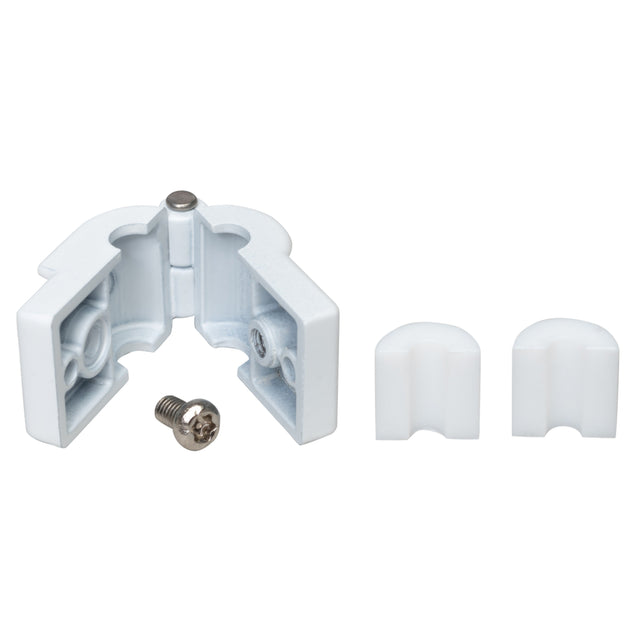
DigitaLinx DL-AP2 Security Clamp to Attach Apple Adapters to DL-AR System
DigitaLinx | SKU: DGTLX-DLAP2

Authorized Dealer
Loading...
$1732
Unit price
/
Unavailable
In Stock
Pick up available In-StoreEstimated Shipping Widget will be displayed here!
Condition: New
Description
DigitaLinx DL-AP2 Security Clamp to Attach Apple Adapters to DL-AR System
Security Clamp to attach Apple Adapters to DL-AR System
Key Features
- Cast Metal clamp fitted for Apple Dongles
- Foam rubber spacer to protect the adapter
- Connect Apple dongles to the DL-AR digital adapter ring
- Connect other dongles to the DL-AR digital adapter ring
Installation / Use Cases
- Use the security clamp to attach compatible Apple adapters to a DigitaLinx DL-AR digital adapter ring in conference, classroom, and presentation systems.
- Secure compatible dongles to the adapter ring so shared presentation adapters remain attached to the installed AV system.
- Use the internal foam-rubber spacer to protect the adapter while it is held inside the cast-metal clamp.
Frequently Asked Questions
What is the DigitaLinx DL-AP2 used for?
It is used to secure compatible Apple and other adapters to a DigitaLinx DL-AR digital adapter ring.
What material is the DL-AP2 clamp made from?
It uses a cast-metal clamp.
Does the clamp protect the adapter from the metal housing?
Yes. A foam-rubber spacer helps protect the adapter inside the clamp.
Can the DL-AP2 hold adapters other than Apple dongles?
Yes. The product information states that other compatible dongles can also be connected to the DL-AR digital adapter ring.
Why use a security clamp with an adapter ring?
It helps keep shared adapters physically attached to the presentation system instead of leaving them loose or easily misplaced.